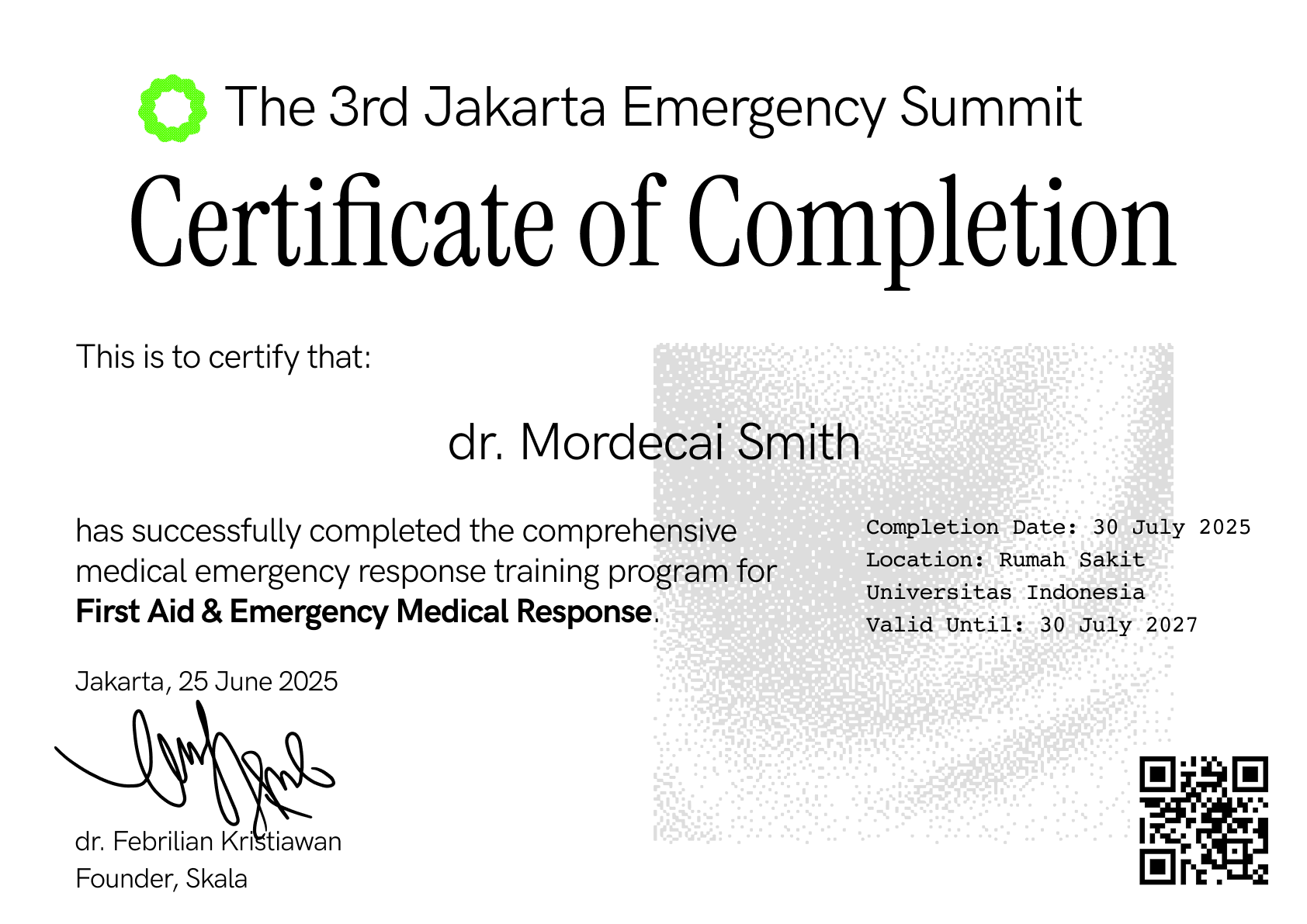
Why Developers Choose Our API
Lightning Fast
Generate certificates in under 2 seconds. No queues, no delays, just instant results.
Design Freedom
Use any PDF template. Our API adapts to your design, not the other way around.
You can download the PDF template as a Figma file
Auto Resizing
We auto-resize text so you don't have to worry about people with long names
Customization
Change certificate settings to your liking such as font colors, font styles and more
QR Code Integration
Automatic QR code generation with your custom verification URL
Custom Certificate IDs
Use your own certificate ID format or auto-generate secure ULIDs
Authentication
All API requests require authentication using an API key. You can provide the API key in two ways:
Method 1: Header (Recommended)
Method 2: Query Parameter
API Endpoints
Generate Certificate
Generates a certificate and returns JSON with download URL and certificate details.
Parameters
| Parameter | Type | Required | Description |
|---|---|---|---|
certificate_name |
string | Required | Full name of the certificate recipient |
template_url |
string (URL) | Required | URL to the PDF certificate template |
style |
string | Optional | Certificate style (default: "Classic") |
certificate_id |
string | Optional | Custom certificate ID (auto-generated if not provided) |
project |
string | Required | Project folder name for organizing certificates in storage (becomes part of the upload path) |
certificate_id_prefix_url |
string | Optional | Base URL for QR code generation |
webhook_url |
string (URL) | Optional | Webhook endpoint to receive processing notifications |
Health Check
Check the API status and health.
File Organization
The API automatically organizes generated certificates using the project folder structure. This helps maintain clean separation between different events, courses, or campaigns.
Upload Path Structure
Examples
| Project | Participant | Upload Path |
|---|---|---|
graduation-2024 |
John Doe | graduation-2024/john-doe-CID-123.pdf |
tech-conference |
Jane Smith | tech-conference/jane-smith-CID-456.pdf |
webinar-series |
Alice Johnson | webinar-series/alice-johnson-CID-789.pdf |
This structure makes it easy to:
- Organize certificates by events or projects
- Browse storage with clear folder separation
- Manage permissions per project folder
- Generate reports and analytics by project
Available Styles
Choose from our predefined certificate styles to match your brand and occasion:
Classic
Traditional serif font with elegant positioning. Perfect for formal ceremonies and academic achievements.
Modern
Clean, contemporary design with custom Overused Grotesk font. Certificate ID positioned in bottom right.
Modern-Dark
Same as Modern but optimized for dark background templates with light-colored text.
Professional
Business-focused design with Times Roman font. Ideal for corporate training and professional certifications.
Card
Compact design optimized for card-sized certificates and badges.
Webhook Integration
The API supports webhook notifications to inform your application about certificate processing
results. When you provide a webhook_url parameter, the API will send a POST request to
that endpoint with the processing results.
Webhook Events
| Event | Description | When Triggered |
|---|---|---|
certificate.generated |
Certificate successfully created | When PDF generation and upload complete successfully |
certificate.failed |
Certificate generation failed | When any error occurs during processing |
Webhook Payload
All webhooks are sent as POST requests with the following JSON structure:
Webhook Requirements
- HTTPS Only: Webhook URLs must use HTTPS protocol
- Response Time: Your endpoint should respond within 10 seconds
- Status Code: Return 2xx status code to acknowledge receipt
- Content-Type: Webhooks are sent with Content-Type: application/json
- User-Agent: Requests include User-Agent: Certificate-Generator-API/2.0.0
Error Handling
If webhook delivery fails, the error will be logged but won't affect the certificate generation process. The API will continue to return the PDF file regardless of webhook delivery status.
Example Usage
Basic Certificate Generation
Advanced Certificate with QR Code
Certificate with Custom ID
Certificate with Webhook Notification
JavaScript/Node.js Example
Webhook Endpoint Example (Node.js/Express)
Response Format
Success Response
On successful certificate generation, the API returns a JSON response with certificate details:
Error Response
In case of errors, the API returns a JSON response:
Error Codes
| Status Code | Description | Common Causes |
|---|---|---|
400 |
Bad Request | Missing required parameters, invalid template URL, or malformed request |
401 |
Unauthorized | Missing or invalid API key |
500 |
Internal Server Error | Server-side processing error, template processing failure |
Built-in Certificate Verification
Every certificate includes a QR code for instant verification. Connect it to your own verification system.
QR Code Generation
Each certificate automatically includes a QR code in the bottom-right corner linking to your verification URL with the certificate ID.
Custom Verification URLs
Use the certificate_id_prefix_url parameter to point QR codes to your own
verification system or database.
Unique Certificate IDs
Every certificate gets a unique, cryptographically secure ID (ULID) that you can use for verification and tracking.
https://your-verification-site.com/verify/CID-01HKQRST9V8WXY2Z3ABC4DEF5GHow it works: Set
certificate_id_prefix_url=https://your-verification-site.com/verify and the API will
generate QR codes linking to your verification page with the certificate ID appended.
Features
- Auto Resizing: We auto-resize text so you don't have to worry about people with long names
- Customization: Change certificate settings to your liking such as font colors, font styles and more
- QR Code Integration: Automatic QR code generation with your custom verification URL and certificate ID
- Custom Fonts: Support for custom fonts including Overused Grotesk
- Custom Certificate IDs: Use your own certificate ID format or auto-generate secure ULIDs
- Multiple Styles: Pre-configured styles for different use cases
- Template Flexibility: Use any PDF template as a base
- Cloud Storage: Automatic upload to Cloudflare R2
- Webhook Integration: Real-time notifications for processing results
- Comprehensive Logging: Detailed request and error logging
- Certificate Verification: QR codes link to your verification system with certificate IDs
Simple, Affordable Pricing
Start small, scale as you grow. Cancel anytime, no long-term contracts.
Starter
- Up to 1,000 certificates/month
- All certificate styles
- Custom templates
- QR code generation
- Image embedding
- Cloud storage included
- Email support
- API documentation
Professional
- Up to 10,000 certificates/month
- Everything in Starter
- Webhook integration
- Priority support
- Custom domain setup
- White-label options
- Advanced analytics
- Custom font support
Enterprise
- Unlimited certificates
- Everything in Professional
- Dedicated support
- SLA guarantee
- Custom integrations
- On-premise deployment
- Multi-region hosting
- Volume discounts available
All plans include: No setup fees • Cancel anytime • 99.9% uptime SLA
Ready to Get Started?
Join hundreds of developers who've already streamlined their certificate generation
Pre-Sales Questions
Need a custom integration or have specific requirements?
Quick Response: Usually within 2-4 hours
All plans include: No setup fees • Cancel anytime • 99.9% uptime SLA
Technical Documentation
Complete API reference and integration guides
https://certgenapi.skalatec.comAuthentication: API Key via header or query parameter
Response Format: PDF file or JSON error